01 MARKETING BUDGET MANAGEMENT
Summary
As lead product designer, I designed an invoice tracking experience that gave marketers and finance teams a centralized view of invoiced spend against purchase orders and budgets.
Context
Marketing teams managed different parts of their budgets across separate tools and spreadsheets, making budget spending difficult to track in one place.
Marketing Budget Management tool manages the full lifecycle of marketing budgets. The tool lets users create a budget, divide it into sub-budgets, divide each sub-budget into marketing campaigns, and attach a Purchase Order (PO) to each campaign. Before the tool existed, marketing teams managed this work across several tools and Excel spreadsheets, each supporting only one or the some part of the budget management process.
Anatomy of a budget
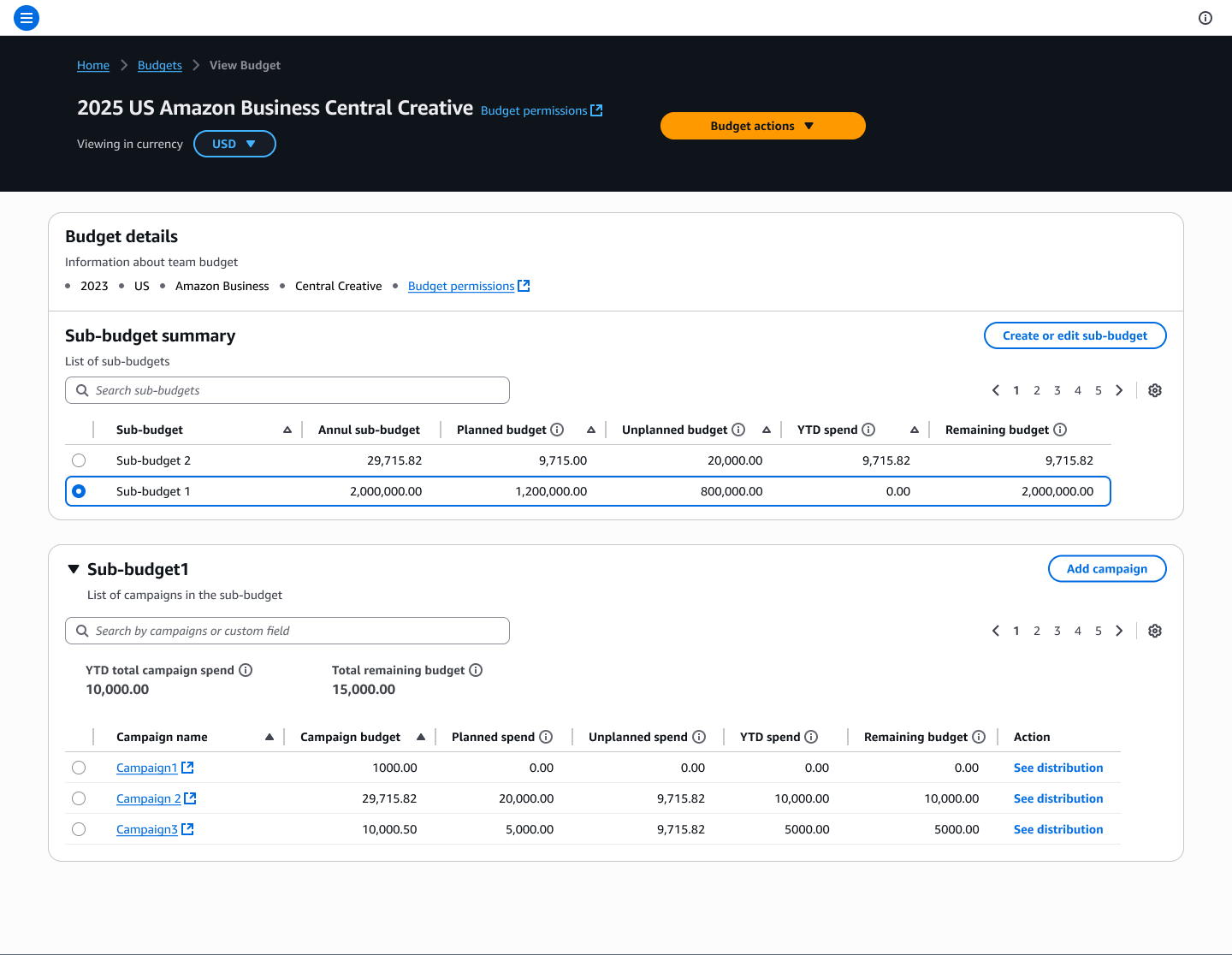
Problem
The tool did not show invoice information. Marketers needed it to record payments against invoices and track the remaining budget. Vendors were only paid once a marketer recorded the payment.
In a budget, a purchase order (PO) is the smallest unit. Each Purchase order (PO) is created for a vendor, covers the services that vendor provides, and is billed to Amazon through invoices.
Invoice data remained a critical gap in the tool for managing the marketing campaigns. The tool showed Purchase orders (POs) and their details, but not the associated invoices.
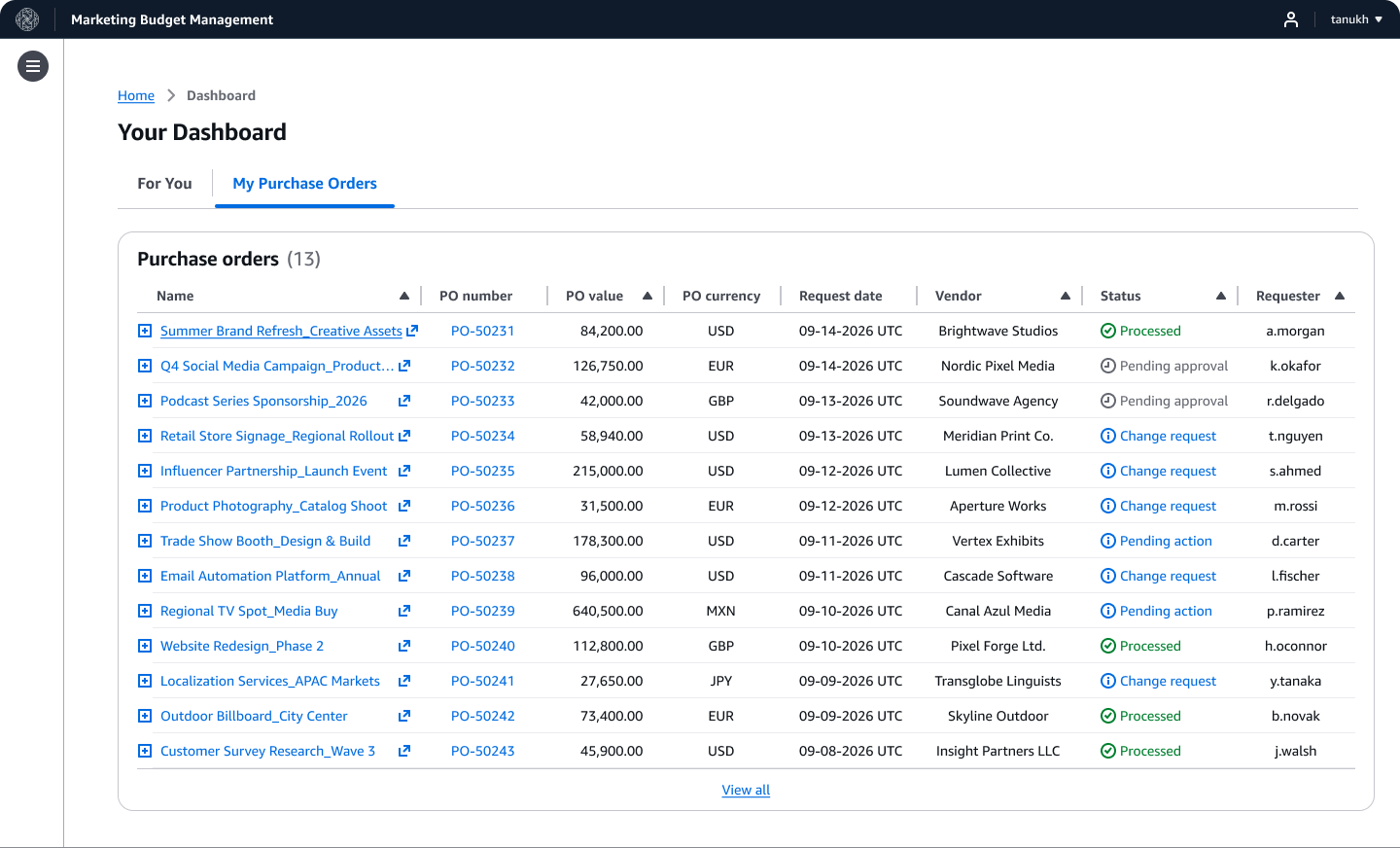
In the current state, users (marketers and finance managers) navigated between three tools: one to create Purchase orders (POs), another to view invoices, and a third to confirm actual spend against those invoices. They export datasets from these systems and compare them manually to identify discrepancies between invoiced and paid amounts.
Customers
Marketing managers and finance managers needed a clear view of how much of each budget had actually been spent.
To manage and close out the financial process, marketers and finance managers need to see the invoice data associated with their campaigns and have the updated budget numbers based on this information.
My role
My primary role was to bridge the gaps between the customer, product, and the technical team. As the lead product designer, I collaborated with the cross-functional team to frame the customer problem and design the product vision to work for the marketing financial process. I shaped the product strategy and product roadmap, based on customer needs.
Scope and ambiguity
It was unclear how marketers and finance manager use invoice data.
Invoice visibility was critical to budget management, but it was not yet clear how marketers and finance managers used this information, and what actions they took after receiving an invoice. The tool integrated with the centralized Amazon financial database and pulled data from there, so I had a constraint to work with the datasets that were available.
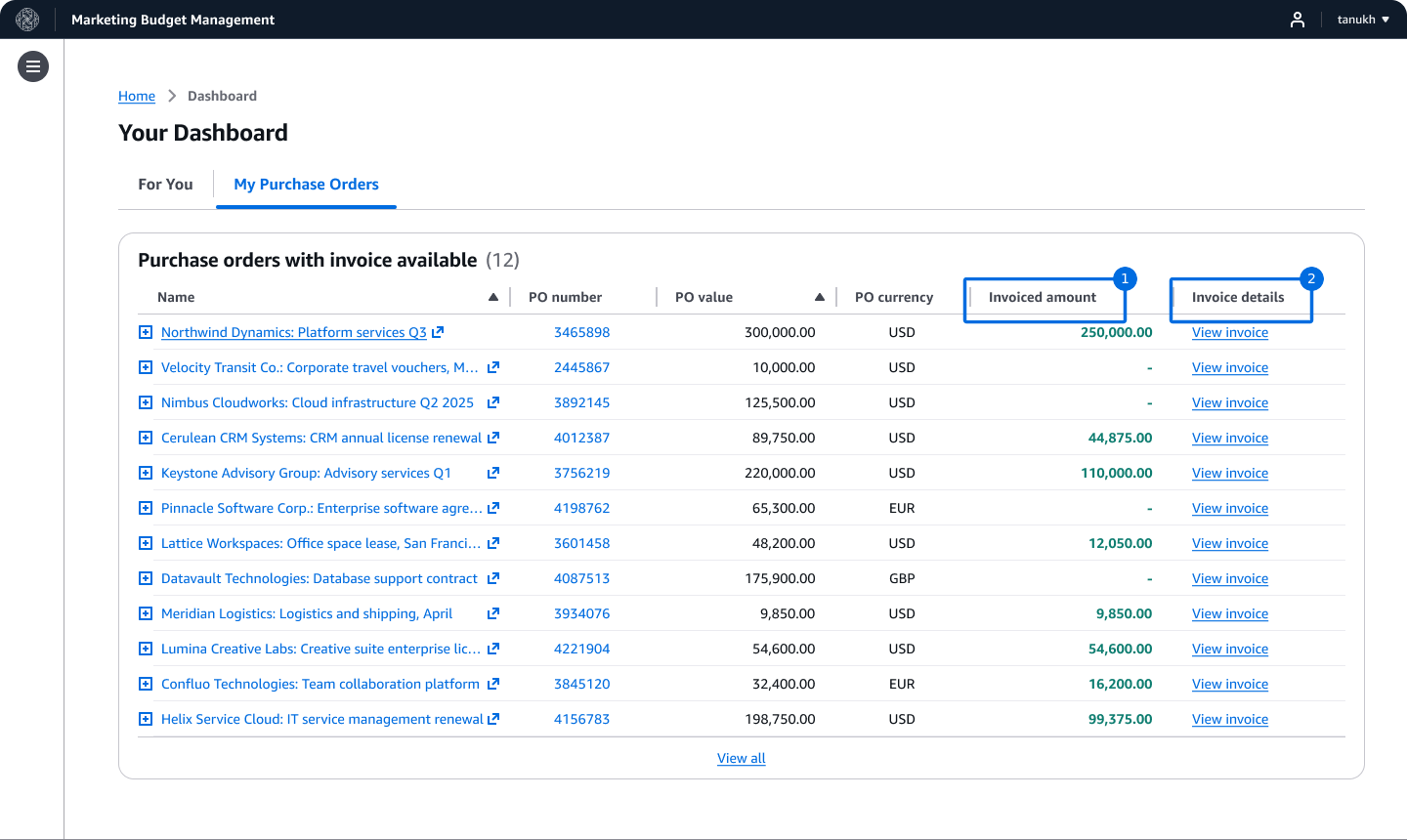
The experience needed to show the correct invoice data from external systems. To complete the financial accounts, users needed to select the invoice, and confirm the payment amount against each invoice. This confirmation of the payment amount ensured that vendors are paid correctly but also recorded this payment entry in the Amazon’s central financial system.
This needed several workflow questions to investigate:
- What do users do when an invoice is incorrect?
- What actions do users take when they are billed more than their budget allows?
- How should the tool handle an invoice for consolidated services when the team has agreed to pay only part of it?
Design process
Framing a fragmented financial workflow
Showing invoices was not enough. Marketers also needed to confirm the payment amount.
I began by understanding how users tracked invoices in their existing workflow and what information they expected to find in the Marketing Budget Management tool.
Through user research, I found that showing each invoice under the correct Purchase order (PO) was only part of the problem. Implementing only a read-only invoice table would have kept the actual financial workflow outside the tool. When a vendor submits an invoice, the marketer completes an action called “receiving” by confirming the amount approved for payment. That amount then flows into Amazon’s centralized financial database, where it records the transaction for financial reporting.
The experience therefore needed to do more than display invoice data. It needed to be easily available for marketers to take action.
Making the complexity visible to the technical team
My designs unblocked product and engineering to understand the workflow and evaluate technical options.
Because the invoice workflow was ambiguous, I started facilitating discussions between product and engineering by designing early vision concepts.
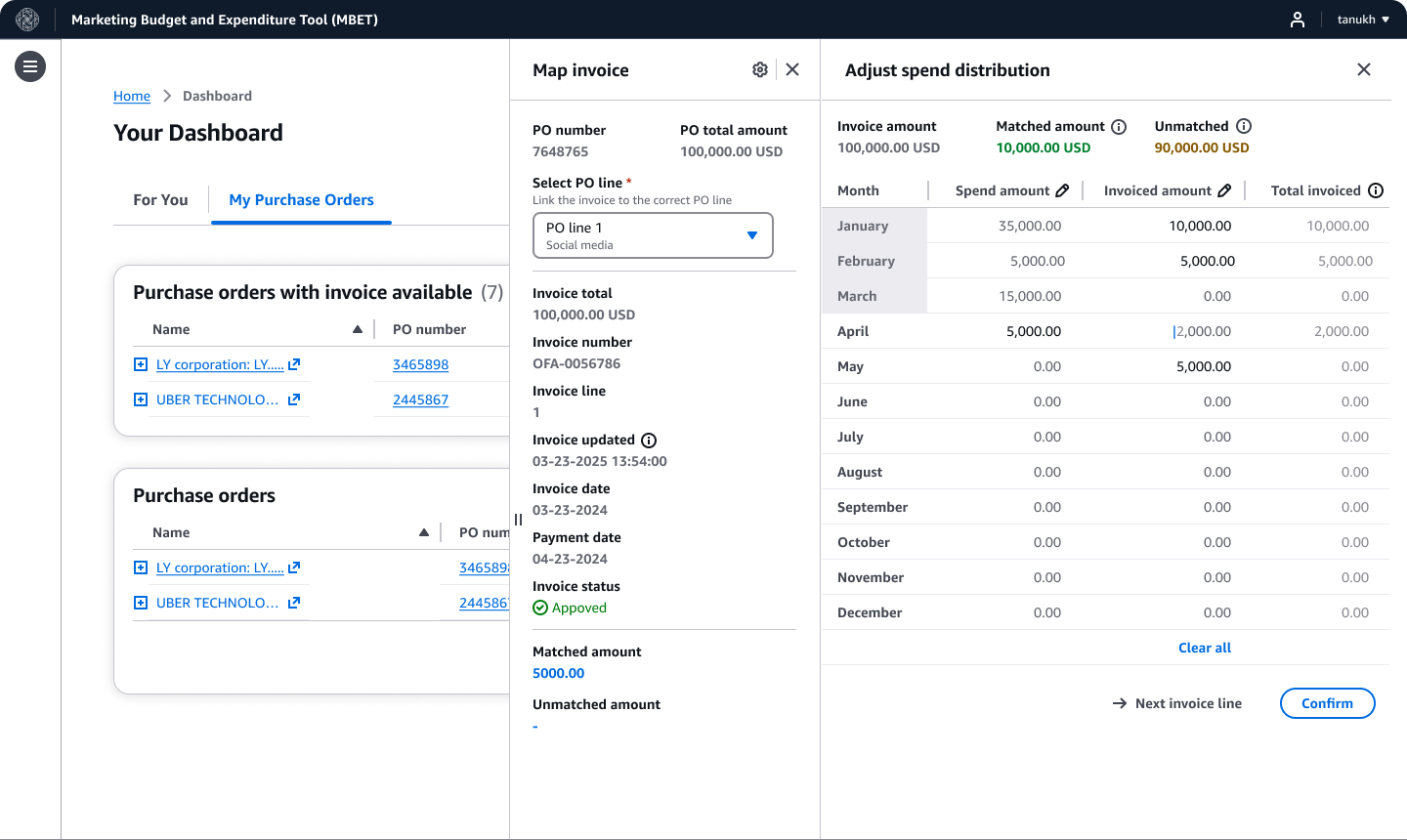
I explored how invoices and their associated Purchase orders (POs) could appear together on the main dashboard. The early concepts showed invoices alongside their Purchase orders (POs), presented invoice fields as read-only information, and displayed the total invoiced amount alongside planned spend for each month. Users could open invoice details, follow payment status, and track invoiced spend over time. These concepts gave product and engineering something tangible to evaluate before committing to a technical approach.
Testing assumptions across six teams
Testing with 12 users across six teams showed that the proposed design did not match how they handled invoices.
I needed to confirm that the proposed experience fit their financial processes. I connected with 12 users across six teams and asked them to evaluate the designs against their day-to-day invoice and spend workflows.
Their feedback changed the direction of the design.
Key learning
Month-by-month distribution was more than users needed
The month-by-month distribution feature was unnecessary for the way users recorded invoice data.
Invoices arrive at any time, sometimes before the service and sometimes months after it is delivered
The feedback from users shaped what the simple experience could look like. Bringing user feedback into the team discussion gave product and engineering confidence to commit to a simpler workflow and prevented us from building interactions that users did not need.
Simplifying the experience around real invoice behavior
Invoice tracking moved from the dashboard to the Purchase order (PO) details page, giving marketers one place to view invoices linked to that Purchase order (PO)
User research also changed where I placed invoice information. I initially explored showing invoices alongside Purchase orders (POs) on the main dashboard. However, some Purchase orders (POs) remain active for long periods and continue receiving invoices into the following year, especially when they begin between October and December. I moved the invoice history into a dedicated tab within each Purchase order (PO) page. This kept the dashboard focused while giving users one place to track every invoice associated with that Purchase order (PO) over time.
I simplified the experience so users could track invoice data continuously instead of distributing amounts month by month. This reduced the work required to record an invoice and better matched users’ regular financial process.
Turning the design into a scalable technical direction
Designing early gave the technical team a clear path to development, including the edge cases the rules needed to handle.
I facilitated several rounds of collaboration to work through technical constraints, edge cases, and details of the user experience before launch.
Systems thinking: Removing duplicate work across financial tools
Using invoice data already available in Amazon Financials enabled automatic matching.
Once the invoice matching workflow was defined, users could record the amount approved for payment in the Marketing Budget Management tool and send that transaction to Amazon Financials. I continued examining the end-to-end workflow and found another opportunity to reduce manual work.
The integration could also pull payment information already recorded in Amazon Financials. If a user had confirmed an invoice through another Amazon tool, the Marketing Budget Management tool could retrieve that information instead of asking the user to enter it again. This changed the experience from repeated manual entry to automatic invoice matching, reducing duplicate steps and keeping the information consistent across tools.
Outcome
After launch, qualitative feedback showed automatic matching removed manual invoice reconciliation across multiple tools.
The feature launched in mid-2026.
The Amazon Financials integration reduced the steps users had to complete. Instead of entering invoice amounts manually, Marketing Budget Management tool could automatically match an invoice to the correct Purchase order (PO) and populate the amount charged by the vendor.
After launch, one user described how automatic invoice matching removed work they had expected to complete over the weekend:
“I planned to spend at least an hour of my weekend matching invoices across various tools, but I can cross that off my to-do list with the recent auto-match launch.”
User feedback after launch, lightly edited for clarity.